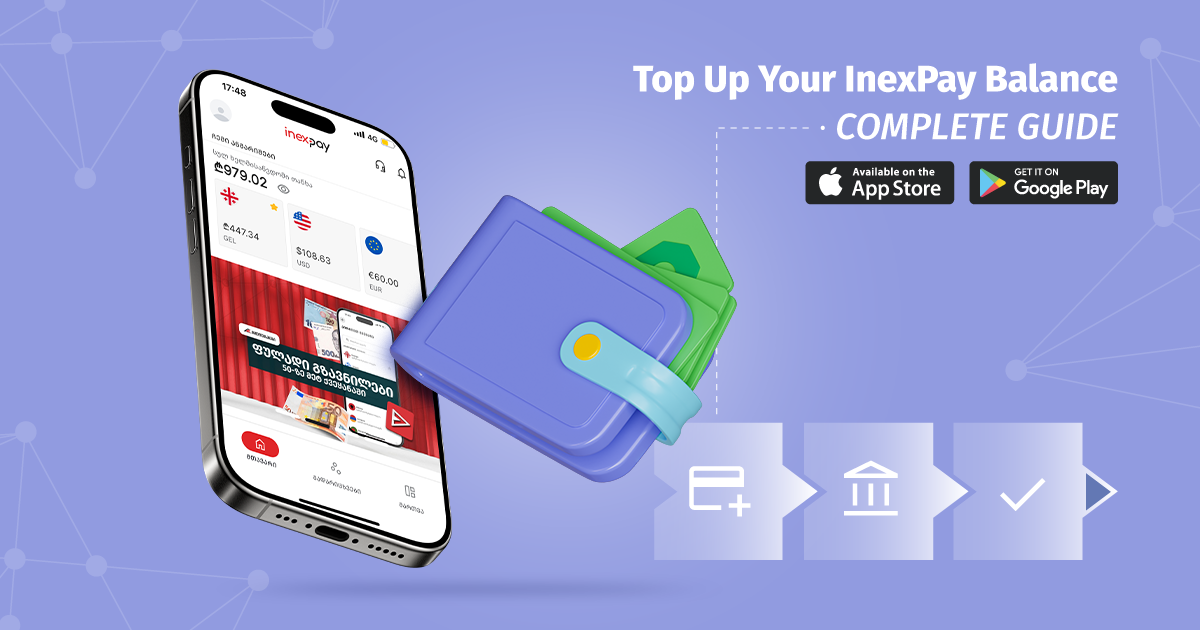
At InexPay, we’re constantly working to make financial transactions as simple and convenient as possible. That’s why you can top up your wallet directly from your online banking account using the details provided in the InexPay app.
The process only takes a few simple steps, but it’s important to follow each one carefully to ensure your funds are credited to your account without delays.
In this guide, we’ll walk you through the entire process of topping up your InexPay Wallet via online banking.
Step 1 – Open the Top Up Page
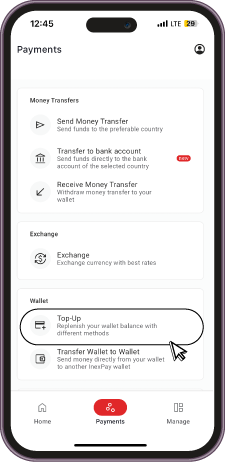
Log in to the InexPay app and select Transfers from the bottom menu.
Then open the Top Up page, where you’ll find all available wallet funding methods.
Step 2 – Select Top Up via Online Banking (Free)
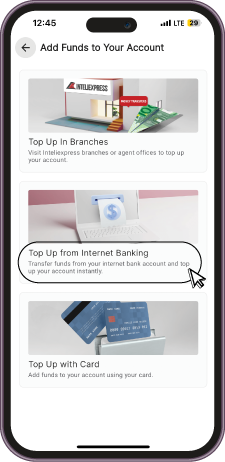
From the available top-up methods, choose Top Up via Online Banking (Free).
This option allows you to transfer funds directly from your bank account to your InexPay Wallet without any additional steps.
Step 3 – Choose Your Bank
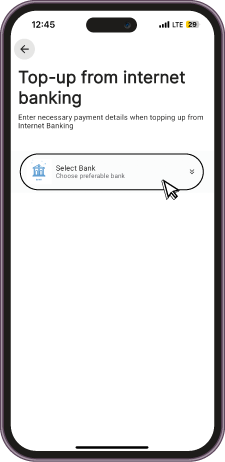
Next, the app will display the list of supported banks.
Select your bank:
- TBC Bank
- Bank of Georgia
Once you select your bank, InexPay will automatically display all the payment details required for the transfer.
Step 4 – Copy the Transfer Details
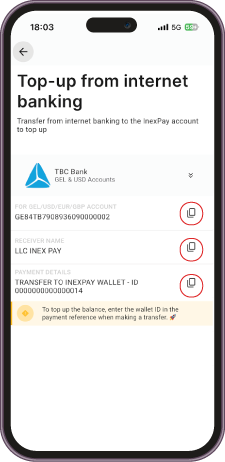
After selecting your bank, you’ll see all the information you need to complete the transfer:
- Recipient’s account number (IBAN)
- Recipient’s name
- Payment Details (Transfer Reference)
Use these details when creating a new bank transfer in your online banking platform.
To avoid typing errors, we recommend copying the information directly from the InexPay app.
Step 5 – Complete the Transfer in Your Online Banking
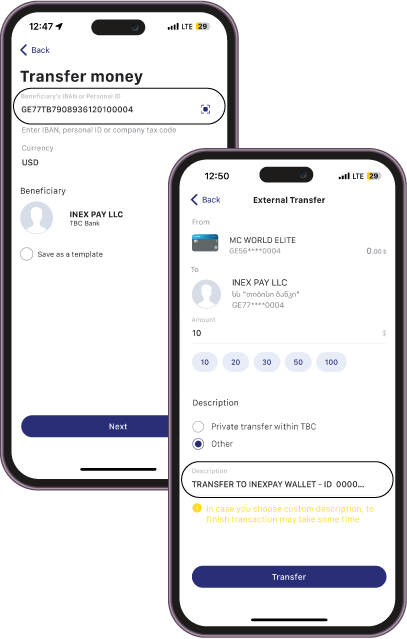
Log in to your online banking account and create a new bank transfer.
Fill in the required fields using the information provided in the InexPay app:
- Recipient’s account number
- Recipient’s name
- Transfer amount
Make sure every detail matches exactly what is displayed in the InexPay app.
Make Sure to Enter the Payment Details Correctly
This is the most important step of the process.
When completing the transfer, you’ll find a field called Payment Details, although the exact field name may vary depending on your bank.
You must paste the exact text generated by the InexPay app into this field.
In most cases, this text contains your unique account identifier, allowing the system to automatically recognize which InexPay Wallet should receive the funds.
If this information is missing or entered incorrectly, your transfer may not be credited automatically and could require additional verification.
Example – TBC Bank
If you’re transferring funds from TBC Bank online banking, fill in all recipient details exactly as shown in the InexPay app.
Pay special attention to the Payment Details field and paste the generated reference exactly as provided, without making any changes.
Example – Bank of Georgia
If you’re using Bank of Georgia online banking, the process is exactly the same.
Enter the recipient information provided by InexPay and make sure to copy the Payment Details into the appropriate reference field.
What Should You Double-Check?
Before confirming the transfer, make sure that:
- The recipient’s account number has been copied correctly.
- The recipient’s name matches the information displayed in InexPay.
- The Payment Details have been entered exactly as provided.
- All required fields have been completed.
Taking a moment to verify these details will help prevent delays and ensure your funds are credited to your wallet as quickly as possible.
Top Up Your InexPay Wallet with Ease
With just a few simple steps, you can securely transfer funds to your InexPay Wallet directly from your online banking account.
Entering the payment details correctly ensures that your transfer is automatically matched to your wallet, making the process fast, secure, and hassle-free.
Simply follow the instructions above, and your balance will be topped up in no time.